
Scenario 7 · Tell me what to change
Once you've read the diagnostic report, the next step is letting AI give you concrete changes — what to scale up, what to pause, what to adjust.
What this scenario solves
The previous scenario, Diagnose, is the "doctor visit" — it tells you what's wrong. This one is the "prescription" — it tells you what to change. AI gives you a priority-sorted list: which ones to scale up, which to pause, which to adjust. Before using: have your Meta account connected + campaigns currently running in it.
How to use it
Click the matching scenario card and the prompt auto-fills:
Review my running Meta ad campaigns and recommend what to scale, pause, or adjust.Types of things AI will recommend
| Recommendation | When AI says this |
|---|---|
| Scale Up | Cost is below the target you set, ROAS is on track, and the current budget isn't maxed out — AI thinks this one is worth more spend |
| Scale Down | Cost has crept up but it's not bad enough to pause yet — ease off the gas a little first |
| Pause | Losing money consistently, CTR dropping, audience fatigued — AI thinks it's not worth continuing |
| Reactivate | A campaign you paused before — conditions changed, worth another shot |
| Adjust ROAS target | The target you set has drifted too far from actual performance — AI suggests you recalibrate |
| Suggest a new campaign | AI spotted some "products in your catalog with real potential that have never been advertised" |
What real output looks like
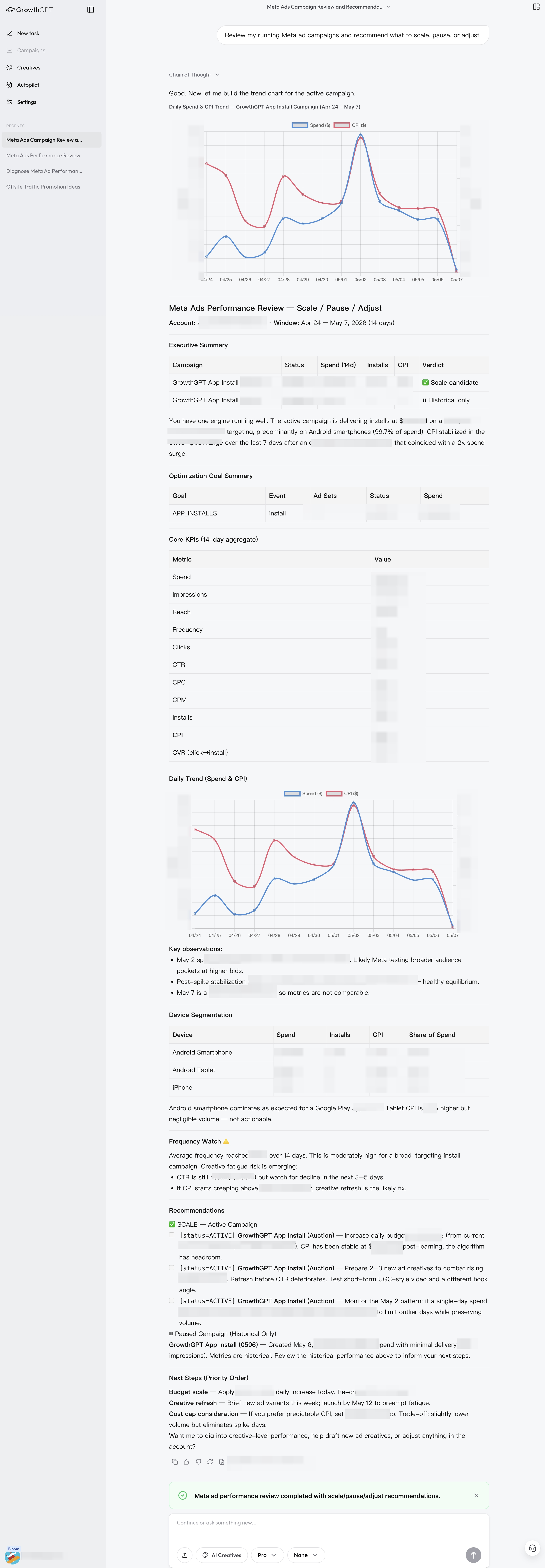
Real output (anonymized) · A priority-sorted list where every item tells you why it's recommended and the expected impact once you do it
Once you've read it, let AI execute directly
No need to change each one by hand — one sentence and AI does it itself:
"Run through the list you made, starting with the most important"
or
"Execute the first 3, but ask me before any budget change"
Don't worry: budget changes, pausing ads — anything that "costs money" — AI always sends it to you for confirmation before acting. It won't touch your account behind your back.
Scenario 6 · How are my ads doing?
Ads suddenly tanking? Running but feeling stuck? This is the starting point for any optimization — let AI give you a diagnosis first.
What AI Creatives Is · Make Ad Visuals by Talking
No need to figure out prompts — send a product photo + one sentence, and AI generates ad-ready visuals.