
Scenario 6 · How are my ads doing?
Ads suddenly tanking? Running but feeling stuck? This is the starting point for any optimization — let AI give you a diagnosis first.
What this scenario solves
Ads suddenly underperforming and you're not sure why? ROAS quietly slipping? This scenario answers exactly that — AI looks at the data in your account, finds the anomalies, and hands you a diagnostic conclusion. Prerequisite: connect your Meta or TikTok account first so AI can actually see your data.
How to use it
Way A · Use the preset scenario
On the New task page, click the Diagnose Ad Performance card. The chat box auto-fills the prompt template:
Diagnose my Meta ad performance. I'm seeing [high CPA / low ROAS / drop in conversions] and want to understand why.Swap the bracketed part for what you're actually seeing, then hit send.
Way B · Just ask in plain English
You don't need the template at all — say it however feels natural:
"Diagnose my last 7 days of ads"
"My ROAS dropped from 3.2 to 2.1 — help me figure out why"
"Why did CPA suddenly jump 30% this week?"
What the report looks like
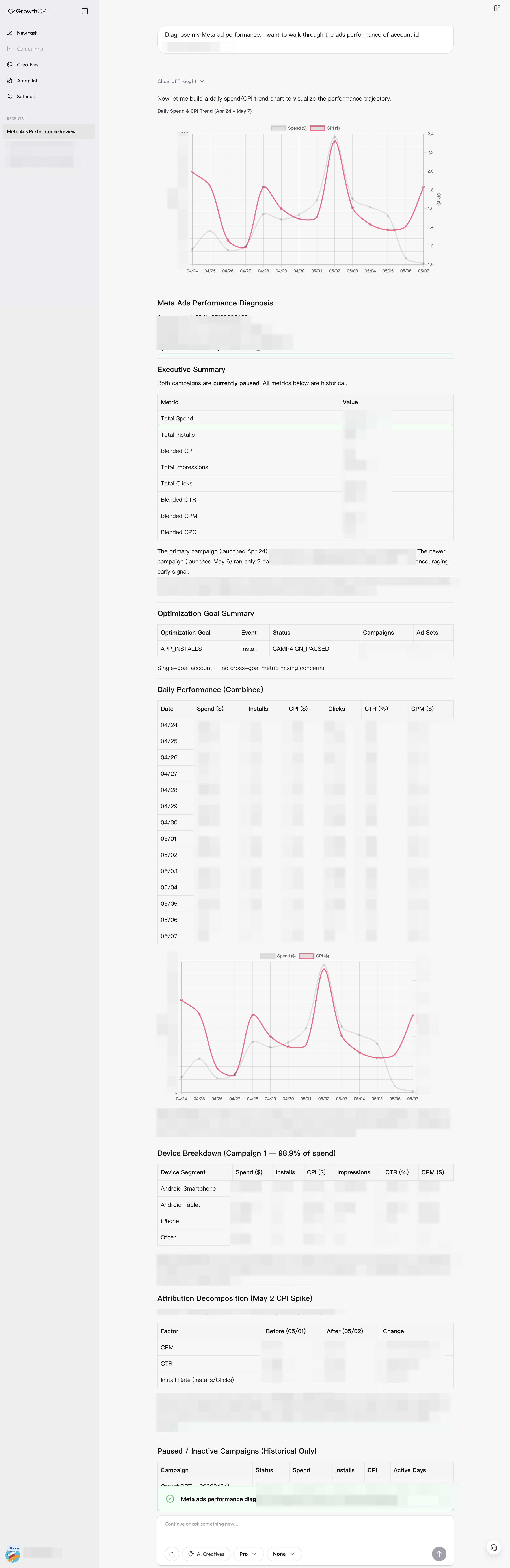
Real diagnostic output (anonymized) · One complete report with an overview, daily trend chart, device breakdown, attribution decomposition, and an action list (each section explained in more detail in #4)
5 phrases to make Diagnose more useful
- "Just look at [campaign name]" — focus AI on digging into one thing instead of spreading across a pile
- "Compare this week vs last week" — change is more diagnostic than absolute numbers
- "Compare how these two audiences perform" — same ad, different audiences running differently? See which one is worth more budget
- "Is this campaign's creative already fatigued?" — AI judges it from frequency and CTR decay
- "After I apply your suggestions, how long until I see results?" — get an expectation so you're not glued to the dashboard for 24 hours
Heads up: running Diagnose without a connected account means AI has no data to look at and can only give generic advice — which makes you think the product is useless. This is the first and most common pitfall for new users. Go connect your account first, then come back.
Scenario 5 · Spin up a new campaign
Want to launch a new ad? Give AI a product URL + your campaign goal, and get a ready-to-ship campaign back in 5 minutes.
Scenario 7 · Tell me what to change
Once you've read the diagnostic report, the next step is letting AI give you concrete changes — what to scale up, what to pause, what to adjust.