
See What the Agent Did For You — In 5 Minutes
Not sure it's worth your time? Spend 5 minutes on one real result — three actions, and you'll have your first AI diagnostic report.
What you'll see in 5 minutes
No commitment, no decision to make yet. In 5 minutes you'll watch an AI agent connect to your ad account, dig through your data on its own, and hand you advice that actually shows judgment. Then decide whether it's worth more of your time.
Three steps, start to finish
① Sign up in 30 seconds
Open growthgpt.app, hit Get Started, and log in with Google or Facebook. There's no email-and-password signup — authorize once and you're in the chat.
② Connect Meta in one sentence
Type "Connect my Meta ad account" right in the chat. AI sends back an authorization button — click it, run through the flow, and your account is linked when you come back.
③ Ask it to look at your last 7 days
Send "Diagnose my ads from the past 7 days." AI scans the account, compares your metrics, and surfaces the anomalies — a full diagnostic report in under 2 minutes.
After 5 minutes you'll have a report like this
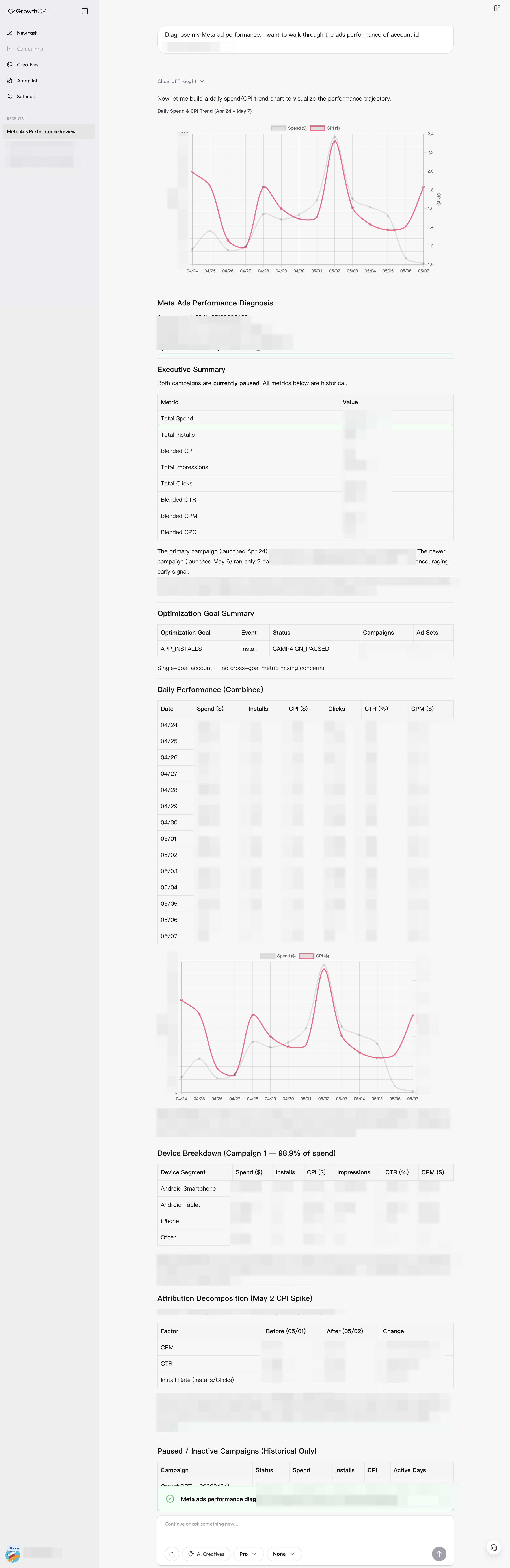
Real diagnostic report (anonymized) · executive summary, full metrics table, daily trend chart, device breakdown, attribution decomposition — one report that spells out "where you stand, what's wrong, and why."
The biggest difference from ChatGPT: it doesn't just hand you "advice" — it actually read your data and made the call. Once you've seen the report you can say "go fix my ads based on this," and it really gets to work.
Want to keep going?
Next up, Link Your Ad Account walks through the details of connecting — handling multiple accounts, what the permission scopes cover, and what happens once you're linked.