Brand Profile · Let GrowthGPT Remember Your Brand
Enter your brand info once, and every strategy, creative, and analysis after that picks it up automatically — no more repeating your product story every session.
What is a brand profile
A brand profile is the persistent memory GrowthGPT builds for your brand — enter your brand name, value props, target audience, competitors, logo, and product images once, and the system pulls them in automatically every time you do market research, ad creation, creative generation, or data analysis. No need to re-introduce your product every session.
In one line: set up the profile once, and every chat "knows" your brand — saving you the 3-5 minute warm-up of typing the same context again.
What's in the profile
| Section | Fields |
|---|---|
| Basics | Brand name · one-line positioning · industry · main regions · website |
| Business overview | Main products / services · price range · sales channels (DTC / marketplaces / offline) |
| Market & audience | Target user persona (age · gender · interests · geo) · key markets |
| Competitors | 3-5 direct competitors with brand name and website (used for comparative analysis) |
| Visual assets | Logo (square + horizontal recommended) · product hero image · brand color · font preference |
How to create one
Just tell AI — any of the three lines below will start the guided flow:
"Create a brand profile for my brand"

"Remember my brand info"

"Set up brand memory"
You can also paste your website URL directly — the system will crawl it, extract the basics, product categories, and hero images, and let you review and add anything missing.

Where to start · sidebar Brands → top-right Add product
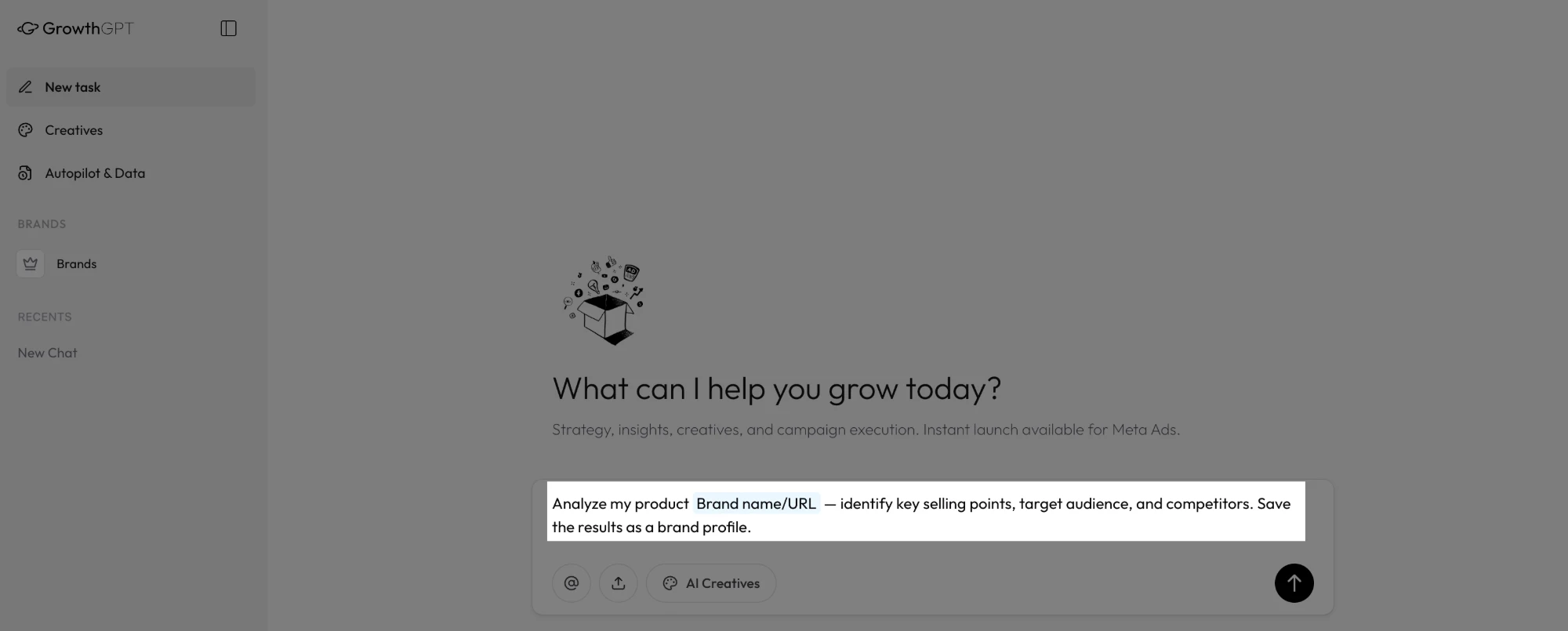
In New task, just swap Brand name/URL in this prompt for yours — AI builds the profile for you
How to update it
The profile isn't locked once you create it — update it anytime by asking AI:
- "Update my brand profile, add a new value prop: xxx"
- "Replace competitor A with competitor B"
- "Upload this new logo to my brand assets"
Updates take effect immediately — the next conversation starts using the new content; no manual sync needed.
Where it gets reused automatically
Once your profile is in place, the system automatically reads your brand info in these scenarios — no need to repeat yourself:
- Image generation — auto-applies your logo, product hero, and brand color without re-uploading (see What is AIGC)
- Ad creation — auto-fills brand name, value props, and target audience into copy templates (see Scenario ③ Launch a Campaign)
- Growth strategy — auto-compares your positioning vs. competitors and suggests where to differentiate (see Scenario ⑥ Plan Growth Strategy)
- Data analysis — analysis reports automatically include a "your positioning vs. this performance" lens
Tips
- You can have multiple profiles — if you manage multiple brands or sub-brands, each profile switches independently with no cross-contamination
- Upload a square AND a horizontal logo — square for avatars/icons, horizontal for banners/ad headers; the system picks based on the scenario
- Use white-background hero images — they blend into any background, giving AI more flexibility when composing creatives
- Pick real comparable competitors — industry giants aren't always your competitors; pick the 3-5 brands closest to your customer persona and price point
Your brand profile stays private — all info is encrypted, only your account can read it, and it's never used to train models or shared with third parties.
Creatives Library
The images AI generates and the product photos you upload all auto-archive here — this article covers how to search, tag, and reuse them.
5 Universal Follow-Ups + 1 Positioning Sentence
Got your first AI output? These 5 follow-ups squeeze out 80% of the value. Plus the official one-sentence positioning of GrowthGPT.